

Run Your Entire Schoolfrom One Screen.
Explore our complete ERP suite, from admissions and attendance to fee collection, payroll, library, transport, and live parent communication.
Every feature your school
needs. Nothing it doesn't.
84 features across 17 categories in one connected system, not a bundle of add-ons. Below are the highlights for each of the four people who use it: what they get, what changes for your school, and how it differs from the way other school ERPs are built. The full walkthrough is the demo.
Admin workspace
For the principal and the office
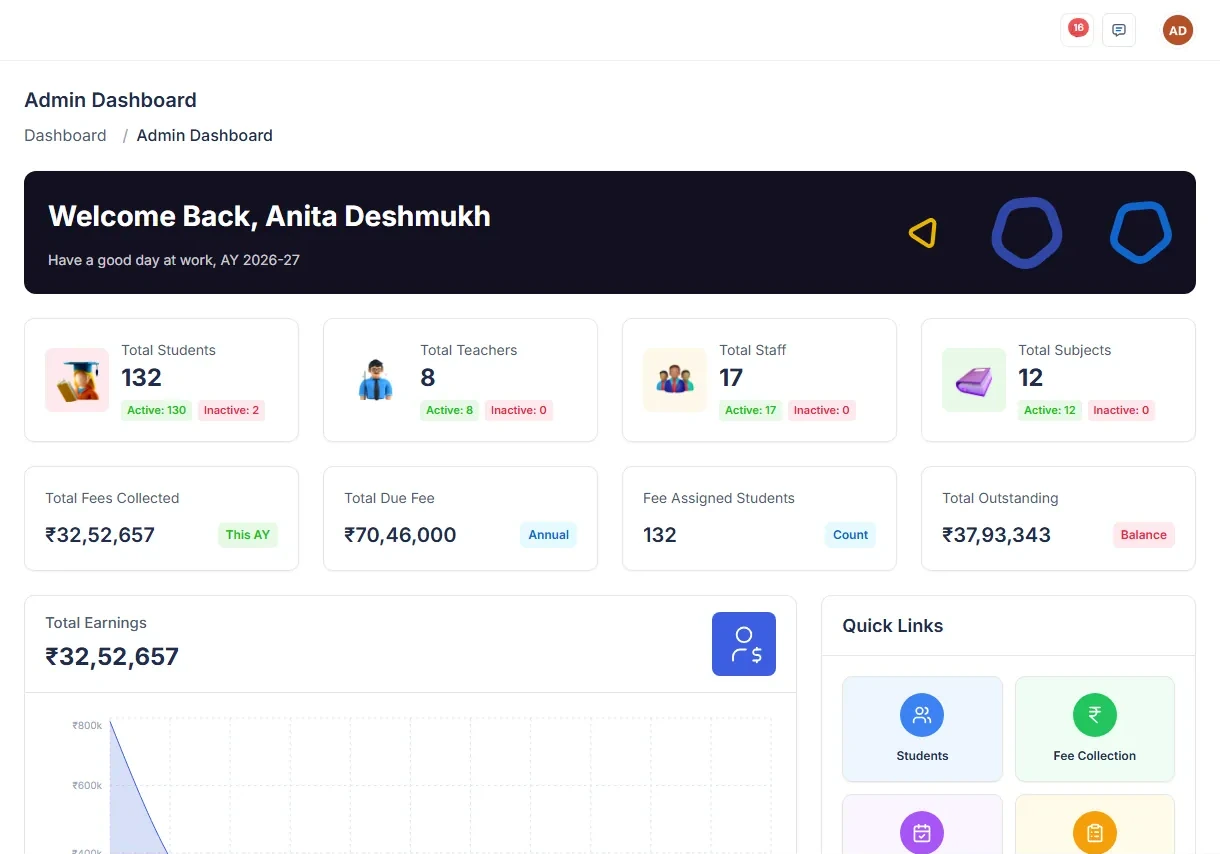
The screen a principal or administrator lands on. One page that answers the questions you would otherwise walk around the building to ask: how many children are in today, what came in at the fee counter, who has not turned up, and what is waiting on your reply.
What you get
- A dashboard that reads live from every part of the school, not from last night's job
- Today's attendance, today's collection and today's staff presence, side by side
- The exceptions surfaced first: absentees, overdue fees, unanswered complaints
How it helps your school
- You know yesterday's collection and today's staff attendance before the first cup of tea
- The morning starts with the handful of things that are wrong, instead of a hunt for them
- A question in a management meeting gets answered during the meeting
How this is different from other school ERPs
Most school ERPs open on a wall of static tiles refreshed by a nightly job, so the number on screen is yesterday's, and finding the students behind it means an export to Excel.
Every figure is live and clickable through to the records that produced it. Nothing on the dashboard is a dead end.
See all 84 running on your own data.
A 30-minute walkthrough using your real classes, fees and staff. No slides.
Got Questions?
We've got answers.
Ready to Simplify YourSchool Operations?
Stop managing systems. Start managing growth.
Book your Free Demo Today.